What to do so your email doesn't fall into SPAM?

Why didn't your email reach the client? - it must be the hosting's fault! Why don't the emails with invoices reach me? Why did the offer you sent fall into SPAM? Questions of this kind come up every day. How is it that we can fly a drone on Mars, yet we can't deliver an electronic letter?
Sign up for the newsletter so you don't miss updates to this post.
Email was invented in 1965, and the service for sending mail between computers in 1971. Since 1982 you've been using the SMTP protocol to send emails — a technology that's about 40 years old! A mature technology, but does that mean it has no flaws?
Even though over this time quite a few technological solutions have appeared that improve the email system, it's still the most unreliable and least secure communication medium. Mail providers bend over backwards, and unwanted messages reach inboxes anyway.
Table of contents
- What really is SPAM?
- Which country sends the most SPAM?
- Who decides what is SPAM?
- What mechanisms determine what SPAM is?
- One email arrived and another fell into SPAM
- Is it easy to send a fake email or SPAM?
- What is mail deliverability?
- How to increase mail deliverability?
- Summary
What really is SPAM?
By definition, we call SPAM any unwanted and unnecessary message. And here the difficulties begin for all senders of messages. It's the recipients who decide which message is SPAM and which isn't. No matter how hard you try, if the addressee of your email doesn't want to receive it — they won't. Full stop.
Spam is any message the recipient doesn't want to receive.
You can also receive SPAM via internet messengers, SMS messages or ordinary letters. Any medium for exchanging information can be flooded with unwanted messages.
Which country sends the most SPAM?
The country that sends the most spam is Russia. From Russia comes
Who decides what is SPAM?
How does it look from the sender's side? When you press the Send button in your mail program, it will connect to the SMTP server and instruct it to send the prepared message. At this point the email meets the SPAM-recognition system for the first time. A well-configured mail server scans the mail before sending it and decides whether it's unwanted, or whether it can set off on its way to the recipient.
The next such place will be the server room in which your mail server is located. They too can block outgoing email traffic if they receive information that you're sending SPAM (or, e.g., a newsletter that the recipients' servers complained about).
It's enough for the recipients of similar messages to mark them as SPAM, and then it will be marked that way in your inbox too. Below is an example of a message in GMail. This particular message isn't SPAM for me and is very important: an email with the CV of a potential employee.

If your message reaches the recipient's server, it will be checked there again by anti-spam systems. They'll verify many different parameters of the email and decide whether the message is SPAM and should be deleted, delivered to the SPAM folder or to the inbox.
It can also happen that you send a message that resembles SPAM and many mail systems will mark it as such. GMail reports this in the following way:

An email sent by you may never reach the addressee, and it's not you who decides that! In most cases the servers decide for you and for the recipient.
Read also how: Wirtualna Polska blocks emails to OKO.press Readers.
It's the recipient who decides what is an unwanted and unnecessary message for them, that is, SPAM
The last place where a message from you is verified will be the recipient's inbox. Various filter settings in the inbox will decide whether a given message is SPAM or not and what to do with it. For example, the recipient may have a filter in their inbox that treats every message with the word promotion as SPAM.
What mechanisms determine what SPAM is?
There are really a lot of such mechanisms, from commercial solutions to community projects. Every email provider uses various kinds of filters and software that allow them to determine whether a given message is SPAM. Here are some of the solutions that are used:
- Blacklists (DNSBL — Domain Name System-based blackhole list) - public lists on which servers suspected of sending SPAM are placed (and they don't necessarily have to be sending it, a so-called false positive). If your hosting server ends up on the list, there's a high probability that emails sent from it will be marked as SPAM. The recently popular blacklist dnsrbl.org stopped working, and because of that most mail servers falsely marked correct messages as SPAM.
- AbuseIPDB - a project aimed at helping combat the spread of hackers, spammers and abuse on the Internet, by reporting suspicious IP addresses. Project website: abuseipdb.com.
- IP Reputation - a commercial project similar to AbuseIPDB available at talosintelligence.com.
- SPF, DKIM, DMARC verification - the recipients' servers check the correctness of the DNS records that are meant to help authenticate the sender's mail server.
- Greylisting - a recipient's server that uses the greylisting method rejects emails from unrecognised senders on the first attempt to deliver them. A server that doesn't send SPAM should resend the message, which will then be delivered. From the recipient's point of view this mechanism causes delays in delivering messages, but it effectively fights spammer servers.
- Email syntax analysis - various kinds of filters that check whether the message headers are set correctly.
- Email content analysis - the content of emails is also examined for words and links to suspicious sites used by people sending SPAM. Unfortunately, your emails that contain a lot of links (e.g. a footer with links to social media, the company website) can also get the SPAM label.
- Spam traps - large mail providers have fictitious mail accounts that aren't publicly available. Such an email could be, e.g., . If you send an email to such an address, you'll be considered a SPAMMER, because this email could never have been correctly signed up to your newsletter.
- And many other mechanisms based on Big data and artificial intelligence.
As you can see, there's really a lot of this, most of it on the recipient's side.
One email arrived and another fell into SPAM
Sometimes it happens that one email sent by you reaches the recipient and another doesn't. Or you correspond with one person from a company, while emails from another fall into SPAM. Why does this happen?
Remember that many factors decide what is SPAM. Perhaps both emails were on the border of being and not being marked as SPAM? Or maybe the second email had something that clearly bears the hallmarks of SPAM? I had this happen! I was corresponding with an SEO Agency and the emails reached me without a problem. An email with a PDF attachment (an invoice) was considered SPAM by GMail, because it came from a person with whom I hadn't exchanged a single email up to that point. The message contained no content. There was only the attachment. That was enough for the mail program to consider the email SPAM.
Is it easy to send a fake email or SPAM?
Unfortunately yes. Very easy.
Sending an electronic message differs little from sending an ordinary letter. You write the sender, the recipient and drop it into the letterbox. It's exactly the same with email. You can set who the sender is yourself by changing the appropriate message headers. There are even tools for this, like emkei.cz.
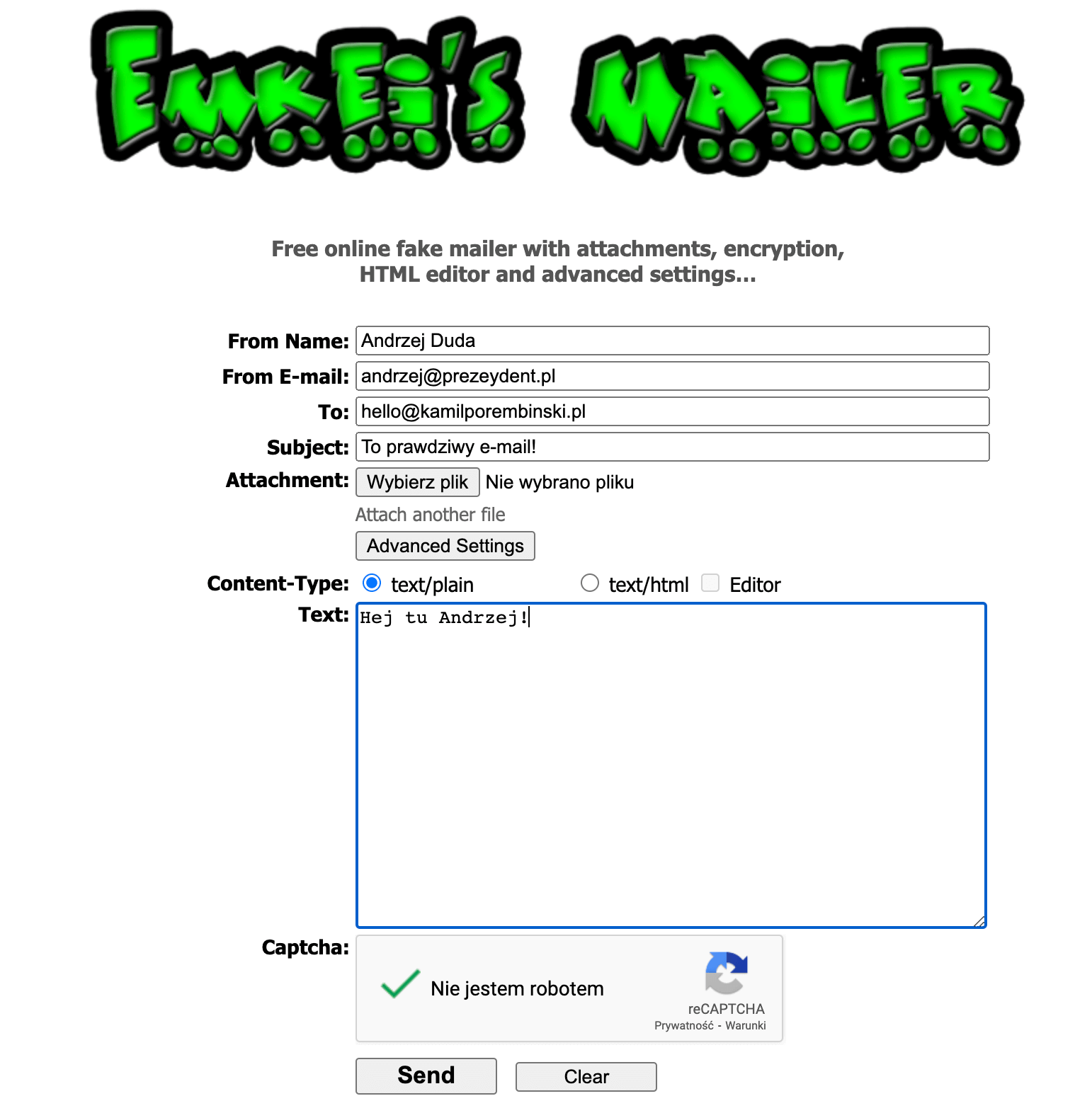
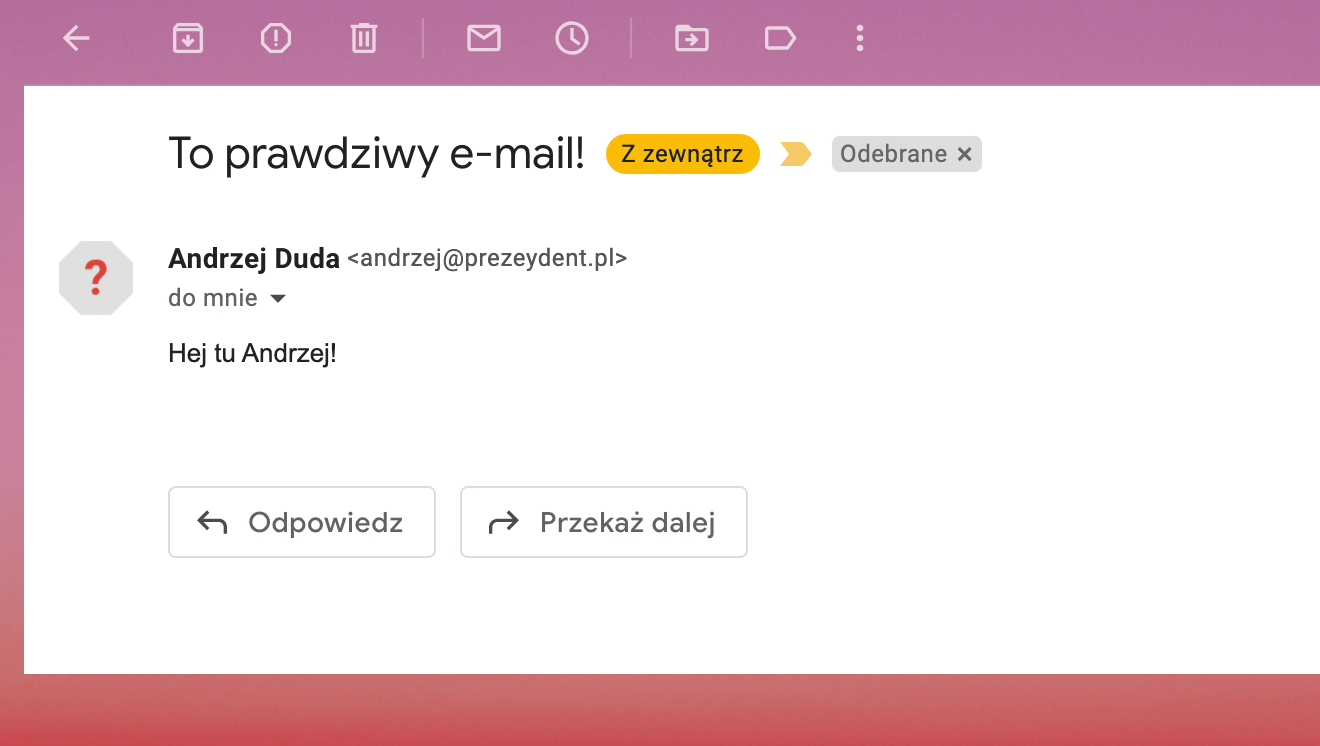
I had no problem sending an email as and Gmail's anti-spam systems didn't mark such a message as fake! How come? It's that simple to impersonate the president's email? Yes.
Remember that impersonating another person is punishable:
Penal Code. Art. 190a. [Persistent harassment. Identity theft]
§ 1. Whoever, by persistently harassing another person or a person closest to them, arouses in them a sense of threat justified by the circumstances or significantly violates their privacy,
is subject to a penalty of deprivation of liberty for up to 3 years.
§ 2. The same penalty applies to whoever, impersonating another person, uses their image or other personal data in order to cause them material or personal harm.
This stems above all from the fact that the domain prezydent.pl doesn't have mechanisms that protect it against being impersonated (the SPF, DKIM and DMARC mechanisms) - phishing - and the message doesn't look like SPAM from the point of view of content filters.
What is mail deliverability?
As you've probably already guessed, the fact that you click the Send button doesn't mean your email will reach the inbox. Some of these emails will be marked as SPAM or will never reach their destination. And here deliverability appears.
Deliverability is a metric that tells you what percentage of the emails you send is delivered and how many will be rejected or marked as SPAM.
Every sender, and above all those who deal with email marketing, will care about increasing deliverability.
How to increase mail deliverability?
Increasing mail deliverability is a bit like SEO. Many small technical and content elements can influence a better position in the search results, just as they can improve the deliverability rate.
Knowing the mechanisms that classify messages as SPAM, you can try to suggest that the message from you is legitimate.
Technical matters
An important element of increasing mail deliverability is the technological aspects. Correctly setting up the mail server, DNS records and many other elements is an important part of making your messages credible.
Remember that even if you set everything up correctly, the recipient can still consider your messages unwanted.
SPF, DKIM and DMARC records. I'll start with these technical things, because there are the most questions about them, and many people believe that using these magic technologies will make their mail reach the recipient. Unfortunately, real SPAMmers also use these mechanisms to make their messages credible.
Set up revDNS
One of the more important things is correctly setting up the revDNS record – that is, reverse DNS. It works by translating the IP address of your sending server into a domain address. Thanks to this, the recipient's server can check whether your messages come from a credible source.
To use this function, you have to contact your mail provider and ask for revDNS to be configured on your server. It's worth remembering that your hosting company has to offer you a private IP address for such a function to be possible.
Unfortunately, many shared hostings don't provide such a possibility, which can negatively affect the deliverability of your email. That's why it's worth choosing a proven hosting service provider that offers a private IP address.
Sender Policy Framework (SPF)
This is a text record in the domain you send emails from, stating which IP addresses you can send emails from your domain. Correctly setting up this record is meant to guarantee that no one will impersonate your email address. However, you have to remember that it's the recipient who decides whether to check that you sent the email from an allowed IP address and what to do about it.
Often this field is ignored by recipients, or the SPF setting merely suggests it.
When sending mail via other services, e.g. mailing systems, you have to set this record correctly to allow them to send addresses on your behalf. Example:
v=spf1 include:_spf.mlsend.com +a +mx include:_spf.google.com -all
This entry allows mail to be sent via Google Workspace, Mailerlite and directly from the server on which this site is kept.
DomainKeys Identified Mail (DKIM)
Since with the SPF record you boasted about which servers can send mail on your behalf, now it's worth authenticating it. When sending an email, in the message headers, your mail program saves encrypted information about the sending. The recipient, by checking the appropriate DNS record in your domain, will decrypt this message to confirm the sender.
An example DKIM record:
v=DKIM1;k=rsa;p=MIGfMA0GCSqGSIb3DQEBAQUAA4GNADCBiQKBgQDeIhtCv3vUinyhKiKtZ8efjHGGo8gE1T+o7gLrvo6yRtdz9ICe6Fz5sgz0WYFW5nCV4DmaTcS25TfgWKsLggGSBdDxzShyvgdKJkG3b4+73rT/5opnRceqQf1qndnMZfkb/0/YciMKNQmigj9IGwKypj6CoIr1s46jRGy4Ws7LQIDAQAB
Domain-based Message Authentication Reporting and Conformance (DMARC)
DMARC is another mechanism based on DNS records that allows you to verify the correctness of an email. If you configure it correctly, you'll see who's sending emails from your domain (e.g. phishing or a server you've forgotten about).
The DMARC technology relies on the SPF and DKIM records, so you have to have them set up. DMARC will pass information to the recipient's server about what it should do with a message sent from your domain: whether it should accept it or reject it because it's phishing.
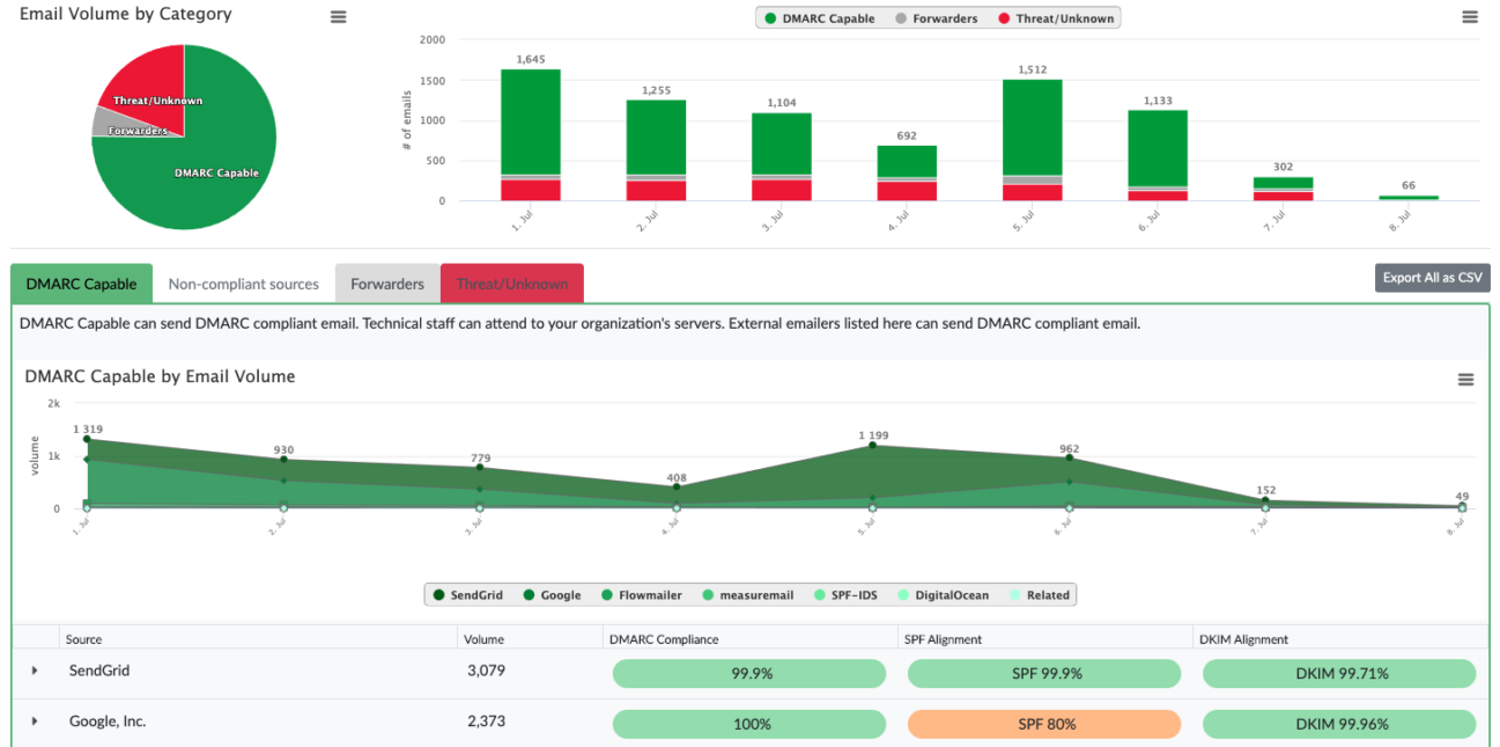
Thanks to DMARC and a service such as dmarcian, you'll receive reports about the sendings from your domain. You'll see which servers send emails but aren't allowed on the SPF list or don't sign messages using DKIM.
Brand Indicators for Message Identification (BIMI)
Brand Indicators for Message Identification (BIMI) is an email standard that allows you to add a brand logo to authenticated messages sent from your domain. Email clients that support BIMI display your logo next to your messages in the inbox. Thanks to BIMI, brand logos and their ownership are verified using Verified Mark Certificates (VMC), so recipients can be sure that the logos displayed in their inbox are authentic.
Thanks to BIMI, your brand logo appears in the recipient's inbox as an icon next to messages from your organisation. The icon can also be displayed inside the message. The recipient's email client determines where the icon will appear for messages sent using BIMI.
BIMI is a standard that's still developing. The latest requirements and news about BIMI can be obtained from the BIMI working group.
An example BIMI record:
v=BIMI1; l=https://kamilporembinski.pl/logo.svg; a=;
S/MIME digital email signature
The S/MIME digital mail signature is a standard tool used to provide security in emails. S/MIME (Secure/Multipurpose Internet Mail Extensions) allows emails to be encrypted and digitally signed, which ensures the confidentiality and integrity of the transmitted information.
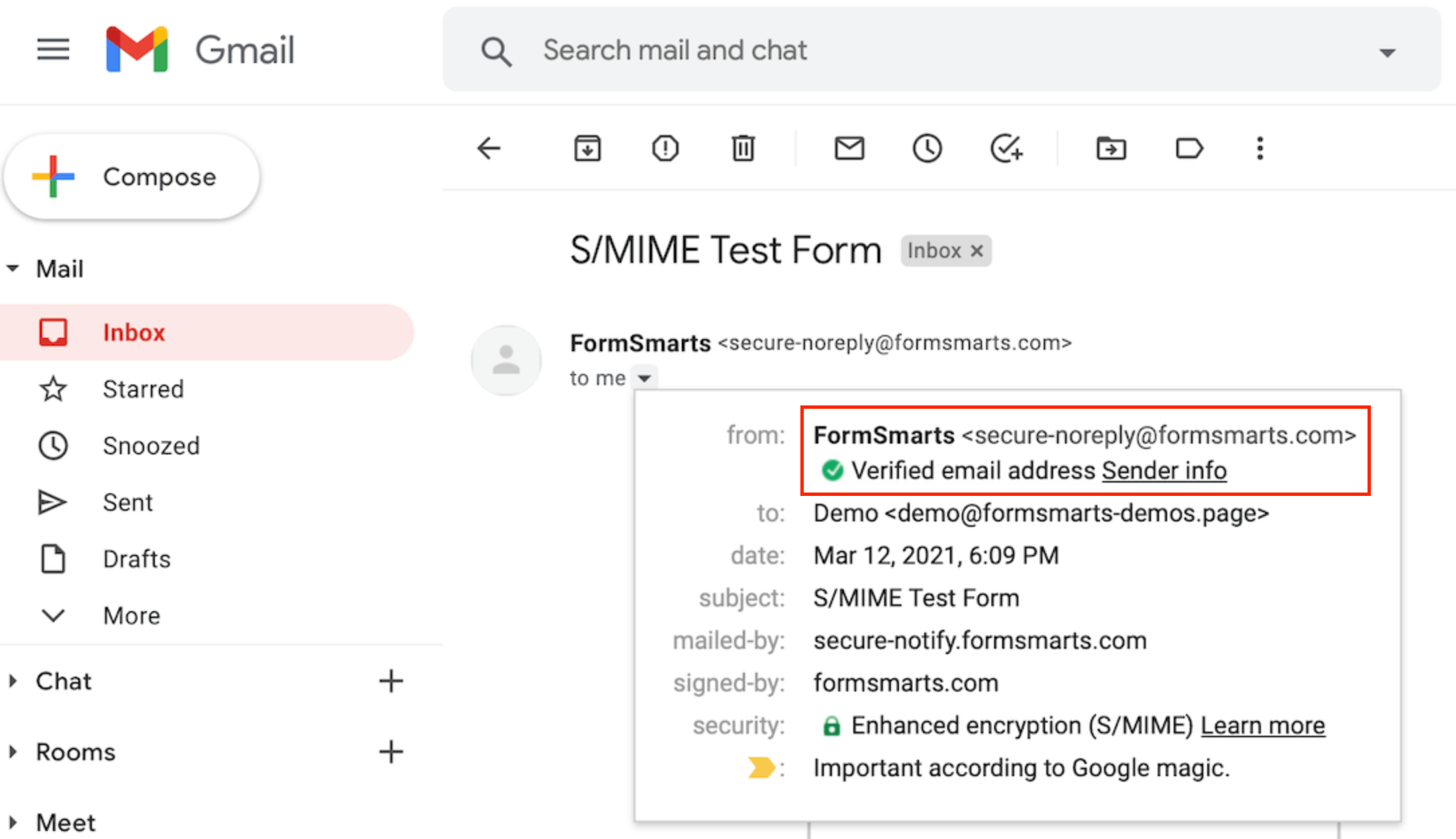
The S/MIME digital signature works through the use of a private key, which is known only to the user who generated it. This private key is used for the digital signature, which allows the sender's identity to be verified and confirms that the message wasn't changed during transmission.
Recipients can verify the authenticity of the S/MIME digital signature through the use of a public key, which is made available by the sender. If the digital signature is verified, the recipient can be sure that the message comes from the genuine sender and that the content wasn't changed during transmission.
To sum up, the S/MIME digital mail signature is a tool used to ensure the security and authenticity of transmitted emails through the use of encryption and a digital signature, which confirms the sender's identity and the integrity of the message content.
Check the reputation of the server and its IP
It can happen that you send emails from the IP address of a server that has a low reputation on the Internet. It usually gets such a reputation because of sending SPAM or reports from recipients.
Using popular tools available online, you can check the reputation of your server, domain or IP address. Remember that these are only tools, not oracles. It can happen that one tool shows your domain is on a server with a good reputation, and another shows the exact opposite.
For verifying IP reputation I recommend using:
- https://mxtoolbox.com/blacklists.aspx
- https://www.abuseipdb.com/
- https://talosintelligence.com/reputation_center/
See for yourself that the first tool, which checks whether your domain appears on blacklists, checks 30 of them in the free version. It won't show that you're blocked on some other one that your recipient is currently using.
In the paid version, your server will be checked on as many as 100 blacklists. Even if you don't appear on them, it doesn't guarantee that the recipient's server doesn't have its own blacklist on which it has blocked you.
What is Greylisting?
The greylisting method works very well at discouraging spammers from harassing your inbox, but it can also be irritating for you if you send or receive mail. Why? Let me explain!
Mail servers that use greylisting will reject your email on the first attempt to deliver it. Yes! They'll reject your email, returning an error code saying that they're experiencing temporary problems. If your server is configured correctly, it will understand such a response and send the email again after a while - in accordance with the mail protocol specification. This time your message will be delivered.
If the mail comes from a SPAM-sending server, it generally isn't sent again, and such a server can be reported to blacklists.
Marketing matters
Not only the technical settings of the sent email can increase its deliverability, but also what the recipient does with it. The fight against SPAM at large providers no longer relies only on simple filters, but also on Big Data. Behavioural filters are also being created, which decide whether a message will be wanted or not.
When sending mail to a recipient who has their mail with services like Gmail, Outlook.com, you have to remember the complicated mechanisms that decide what is SPAM.
When creating an email, it's worth constructing it in such a way that the recipient interacts with the message and doesn't necessarily delete it to the bin or mark it as SPAM.
The mere opening of the message by the recipient gives a signal to the "mail server" that this message isn't unwanted, or doesn't look like it. Adding the sender to contacts practically guarantees that messages from a "friend" won't fall into SPAM. Now you know why many newsletters ask for this in the first email you receive?
Clicking a link in the email, moving it to another folder, giving it a label, suggests that it's something more to you than an unwanted message. Mail systems like Gmail learn how you react to messages and, on that basis, then decide for you what you'll receive.
Analyse the content of your messages
Analysing what you send in your messages is, in my opinion, one of the more important things to improve deliverability. I no longer mean just that good-quality content is willingly received by the email reader, but that all kinds of anti-spam filters will react to it the same way.
The reputation of your email can be ruined by the fancy footer with your company logo that you always add. Many anti-spam filters lower the credibility of an email if it contains attachments, images or links to external sites. And such sites could be, for example, popular link shorteners.
A short link like https://bit.ly/3jq8nUi definitely looks nicer in an email than a full, long address. Unfortunately, services of this kind hide many phishing sites, ones that steal data, etc. That's why inserting such a link into the content of your message lowers its quality.
Set a correct preheader
The preheader is the first sentence that will be displayed in the message preview in the mail program. If it's attractive to the recipient, it will definitely increase the chances of the email being opened. A read email is a signal to anti-spam systems that the message is desirable.

If you don't set this sentence yourself, the mail program will display the first words it finds in the email on its own. And so it could be Newsletter no. 80 or Can't see this message? or information about a 10 zł discount.
Segment your recipients
Since you now know that large mail systems analyse what happens with the emails you send, it's worth stopping sending emails where no one reads them. And so good mailing programs can segment recipients into various groups, e.g. people who haven't opened any of your emails or haven't done so within the last 90 days.
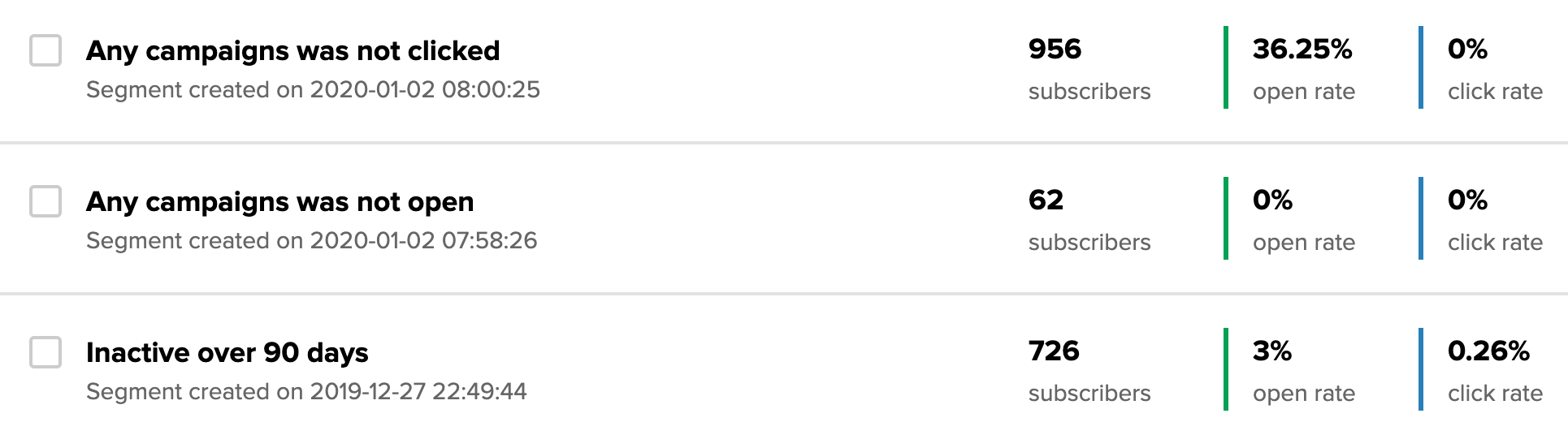
This way you can send the next newsletter only to the group that opens your emails. If you send emails to a large number of Gmail recipients and they don't open your messages, Gmail will start treating your domain as a SPAM sender.
Send emails to people who want them and read them.
Take care of the quality of your mailing list
This is probably one of the most important rules for increasing mail deliverability. By definition SPAM is unwanted mail, so there's nothing worse than sending messages to people who don't want to receive them.
That's why it's so important to remove subscribers who don't want to receive emails from you or never opened them. Such people may mark your messages as SPAM, or their mail systems may classify them that way, since they were never read by the recipient.
Don't get caught by a Spam trap!
A spam trap is an email address - a trap. These are special mail addresses created by mail providers such as, e.g., Gmail, Onet or Wirtualna Polska. Such email addresses never gave consent to receive messages. So if a newsletter from you reaches such an address, you'll immediately be considered a SPAMMER.
Another example of creating spam traps is unused mail accounts. Large mail companies use abandoned email addresses for this purpose.
If you don't monitor your subscriber base, inactive contacts can become a spam trap!
Where does such an email come from in your subscriber list?
Such addresses can be found in mailing databases purchased at online auctions; they can be acquired by collecting emails placed on websites or internet forums; and quite simply, such a spam trap could be an email that no one has used for over a year.
Using double opt-in mechanisms allows you to avoid sending newsletters to spam traps.
Distinguish transactional emails from marketing ones
Transactional emails are all the automatic messages sent after a specific action is performed on your site. An example of such an email could be a password reminder, confirmation of a purchase in the shop, a change in the status of a service's delivery by a courier, etc.
Emails of this kind are very willingly opened and even eagerly awaited by recipients, which is why delivering them quickly and without problems is very important.
In the case of newsletter emails or classic mailings, we're dealing mainly with advertising, conveying sales or educational content. Here recipients very often react negatively to such emails.
That's why it's worth having separate infrastructure for sending transactional emails and newsletters. If recipients consider the latter emails SPAM, then the former, much more important ones, won't be perceived that way.
Transactional emails:
- https://emaillabs.io/
- https://www.redlink.pl/
- https://www.mailgun.com/
- https://aws.amazon.com/ses/
- https://sendgrid.com/
- https://mailchimp.com/features/transactional-email/
- https://www.smtp2go.com/
Email marketing:
- https://www.mailerlite.com/
- https://mailchimp.com/
- https://freshmail.pl/
- https://www.getresponse.pl/
- https://user.com/en/
- https://www.activecampaign.com/
- https://www.hubspot.com/products/marketing/email
Change titles, senders or ask for a reply to the email
Interacting with the recipient can give a positive or a negative result. If the recipient marks your message as SPAM, there's an enormous probability they won't receive the next message. And what if they didn't do that, but only set up filters in their mail? For example, they filter messages from and direct them to the Newsletter tab?
You can probably already guess what can be done. Change the sender of the message to , to bypass the filter and land in the main inbox. In the same way you can experiment with the sender's name, or maybe make a spelling mistake in the message title? Do you know how many people will not only open it but also reply? After all, no one replies to SPAMmers, and the filters of a GMail like that learn quickly.
How to check whether my email might be considered SPAM?
There are many online tools that will help you check whether the emails you send might bear the hallmarks of SPAM. Remember, however, that these are only tools, and even if they don't show that your email is sending unwanted mail, the recipient can still consider it such.
The most popular tool is mail-tester.com. The system generates a mail address to which you should send the message being tested. As soon as it arrives, the email quality result will appear.
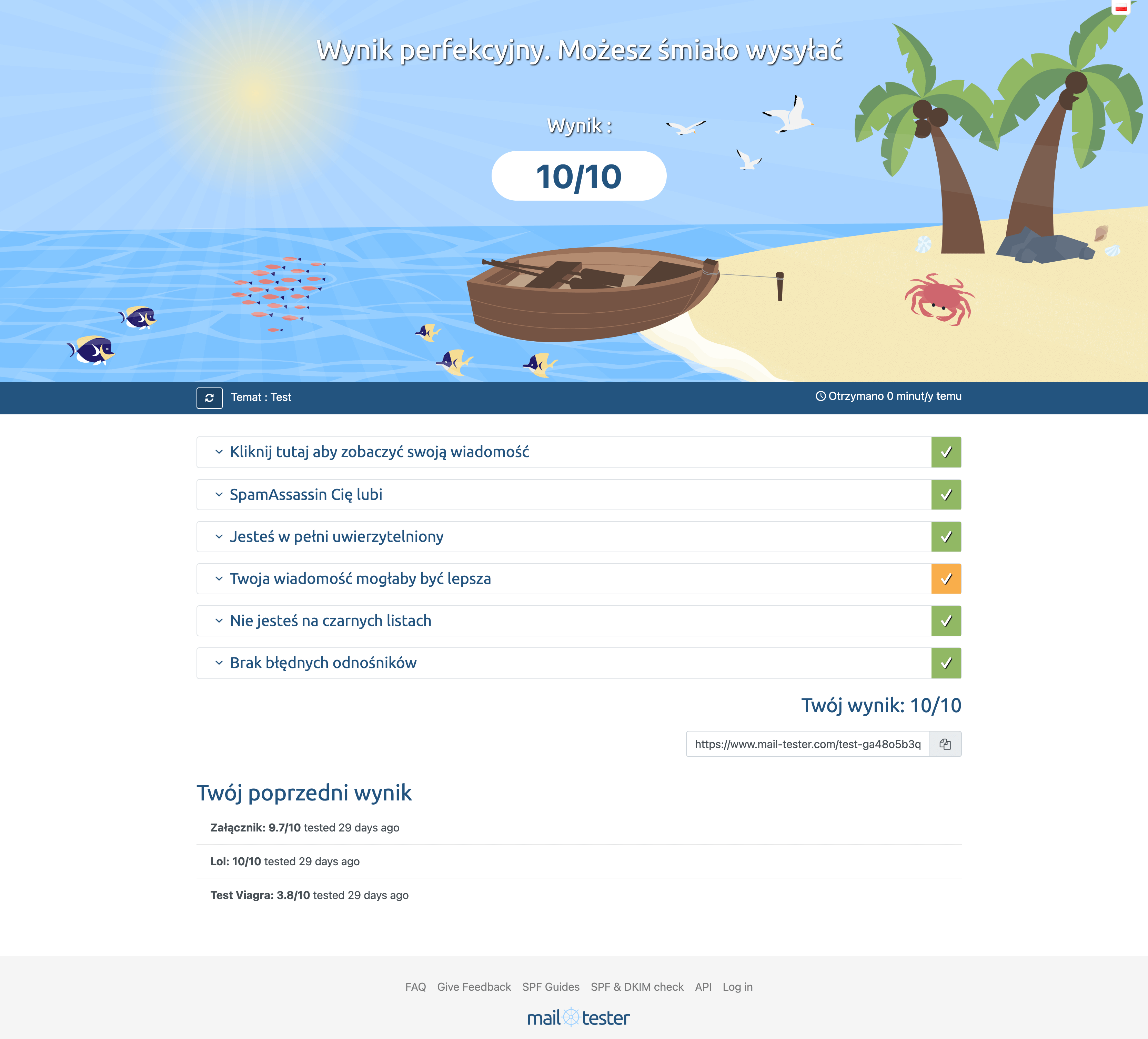
The tool checks the quality of the email content, the correctness of the SPF, DKIM and DMARC records. The servers the email came from are also analysed, and it's checked whether they're on blacklists.
Another tool is, for example:
I send a lot of emails. How to do it best?
Many people ask whether hosting or a single VPS server? Or maybe a dedicated IP address on a shared server? In reality it's best to use services dedicated to sending mailings, like, e.g., Mailerlite, Freshmail or others.
As you probably already know, the recipient's mail systems analyse where an email is sent from. If you send it from a shared server, such as hosting, you have to take into account that other hosting clients also send emails from that server. You don't know the quality of their emails, whether they're not sending unwanted mail, or maybe their site is infected and simply sends SPAM? Anyway... it doesn't even have to send spam.
Servers such as, e.g., Onet's mail limit the number of emails received per hour from a given IP address. So if you send an email from a hosting on which, e.g., there's a discussion forum that sent dozens of notifications to the emails of Onet users, then your email won't reach them. The number of emails received from one IP by Onet will be exceeded.
In such a case even the hosting administrators won't help. While they can still detect a spammer, the forum notifications aren't spam, yet from your point of view they block the delivery of mail to free inboxes like Onet or Wirtualna Polska.
So why don't newsletter services have such problems?
Above all, these systems have specialised in sending large amounts of mail. They take great care of what's sent through their servers and have a large number of IP addresses from which the mail goes out. Thanks to this they can bypass limits, and if one of their IP addresses has a low reputation, they'll use another.
Additionally, such systems very often have an agreement with large mail providers, so that emails from them bypass limits and don't fall into SPAM.
Summary
Email can be compared to a traditional letter. We put it in the box or leave it at the post office. Did we send it? The only thing we can be sure of is the fact that we instructed it to be sent.
Will it arrive on time? Will it even be sent? What route will it travel? How many people along the way can read it, open it, or even change its content?
It's similar with email. Despite the many technologies that increase its deliverability, it's in my opinion one of the worse media for communication. By default it doesn't provide content encryption, and implementing it is difficult for most.
On the other hand, email is one of the most popular, cheap and accessible methods of communication, practically for everyone.
View related articles

IT outages happen to everyone
For the past few hours the internet messenger Slack has been down. A few weeks ago you couldn't use Google's services, and even earlier a large part of the Internet wasn't working because of an outage of Cloudflare's services. Is it possible that cloud services are unavailable?
The Eisenhower Matrix, or how to take control of priorities
Go on a break, or maybe reply to that email, or pick up the phone from your boss? In what order should you tackle these tasks so as not to lose control and fall into helplessness? The solution to these problems may be the Eisenhower Matrix (also called the Eisenhower Box or Eisenhower Square).

Should the RCB Alert inform about the presidential elections?
Communication in an emergency is one of the more important topics covered during sailing, flying or diving. Warnings can save lives, which is why they shouldn't be treated lightly, and even more so shouldn't, by their wording, lead to their being ignored.